The single application through which a member holds, moves and participates across the SWSS ecosystem — one verified identity, one portfolio, and every product settling on the same layer rather than a separate account per product.
SWSS Coin moves between SwssChain and BNB Chain through the bridge in the SWSS Unified App. The coin you hold on SwssChain is locked, and a wrapped representation, wSWSS, is issued to your wallet on BNB Chain. Nothing is converted in the sense of being exchanged for something else: the same holding is represented on a second network, and the bridge holds the original against it.
Before you start
- A verified identity through SWSS IVL, and a wallet connected to the application.
- SWSS Coin on SwssChain, and enough of the network's own gas to pay for the transaction.
- The destination wallet on BNB Chain. The bridge delivers to the address shown on the card: read it before confirming.
The transfer card
bridge transfer --to bnb-chain
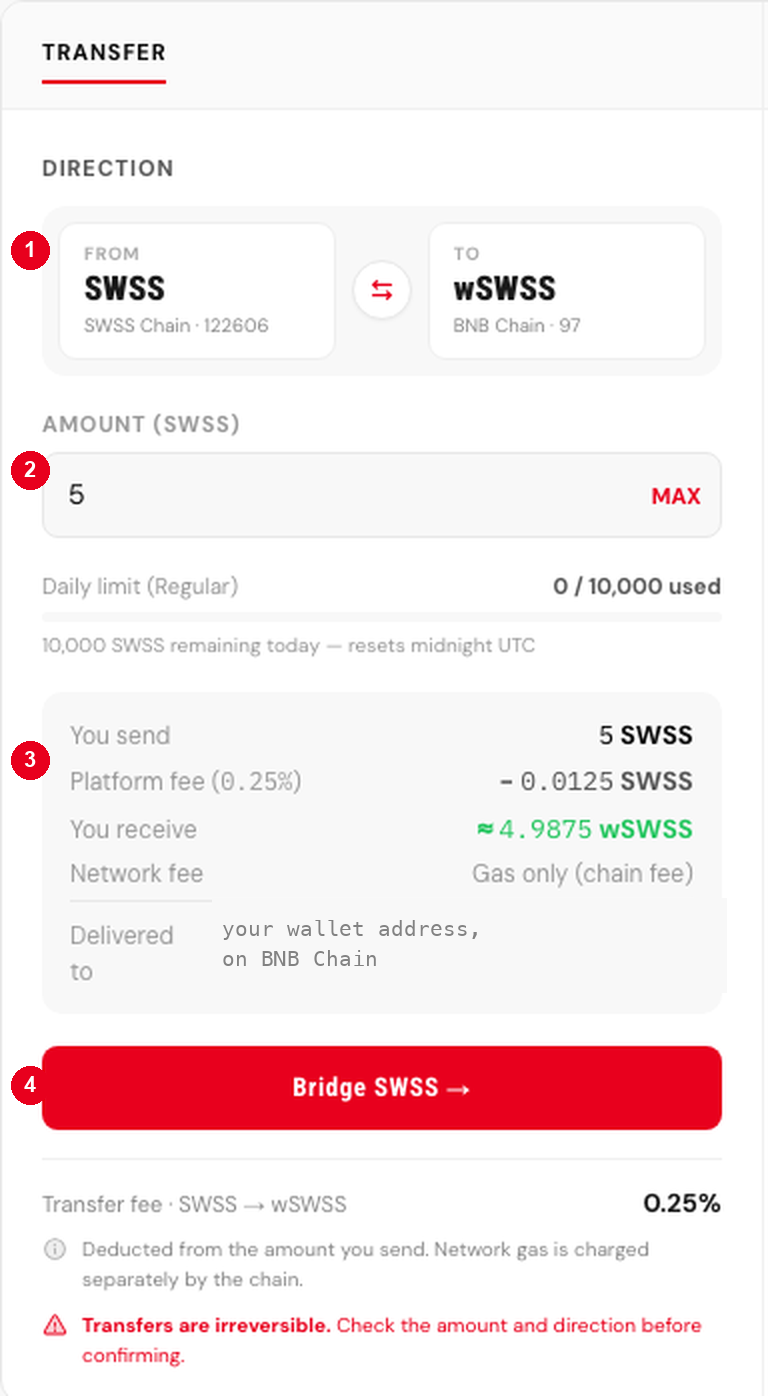
Sample, pending recapture against the current interface.
- Direction. The card opens with SWSS on SwssChain as the source and wSWSS on BNB Chain as the destination. The control between them reverses it, and reversing it is how wSWSS is brought back.
- Amount. Entered in SWSS. A daily limit applies and the card shows how much of it remains; the limit resets at midnight UTC.
- What you receive. The platform fee is deducted from the amount sent, so the wSWSS figure is lower than the SWSS figure by that fee. Network gas is charged separately by the chain and is not part of this calculation. The destination address is stated here, on the card, before anything is signed.
- Confirm. The transfer is submitted. It cannot be reversed, which is why the amount and the direction are worth reading twice.
What happens after you confirm
The amount is locked on the source network and the request is recorded. Releases are performed by the SWSS team rather than automatically, so a transfer is not instant and a larger one may take longer or require further verification. When it completes, the wrapped amount is issued on the destination network and appears in your history.
The bridge publishes what it is holding against what it has issued, on the same page. Both figures are read from the two networks rather than from our records, so anyone can open the contracts and check the arithmetic without asking us.