
The single application through which a member holds, moves and participates across the SWSS ecosystem — one verified identity, one portfolio, and every product settling on the same layer rather than a separate account per product.
The wallet screen is where value moves. It shows what you hold, sends and receives it, and lists what has already happened: with every entry checkable on SWSS Explorer rather than only in the application.
What You Can Do Here
| Control | What it does |
|---|---|
| Send SWSS | Transfers SWSS Coin to another address on SwssChain. |
| Receive | Shows your address for an incoming transfer. |
| Send USDT | Transfers USDT on BNB Chain. A different asset on a different network from the one above: read the screen before confirming. |
| Bridge | Opens the bridge, where SWSS Coin becomes wSWSS and back. |
| Claim rewards | Moves claimable rewards into your balance. |
Shortcuts to staking, identity verification and security settings sit alongside them, so the screen is also a route to the things a balance usually prompts.
wallet --assets
Pending recapture against the current interface.
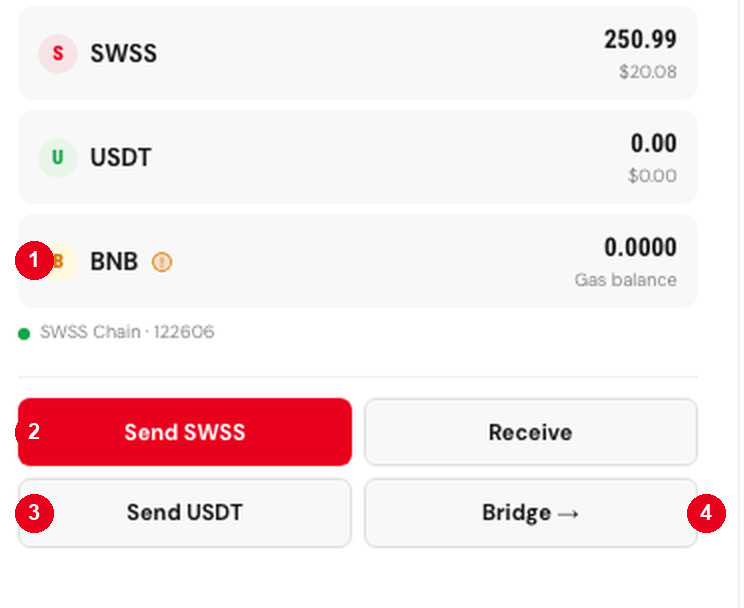
- The gas balance. Held separately from what you are sending. A transfer fails without it, however much SWSS Coin you hold.
- Send SWSS moves SWSS Coin on SwssChain.
- Send USDT is a different asset on a different network. Read which one you are on before confirming.
- Bridge opens the wrapping route rather than sending anything.
Reading the History
History is grouped rather than listed flat: SWSS, Staking, InfraX and Sent. A reward paid daily by a staking position appears under staking rather than mixed in with transfers you made, which is what makes the list legible once a position has been running for a while. Any entry opens on the explorer.
Currency Display
The balance can be displayed in several currencies. This changes the display only. Nothing is converted, no rate is locked, and what you hold is unchanged, the underlying balance is SWSS Coin on SwssChain.
Before You Send
An on-chain transfer cannot be reversed. There is no support action that undoes one, because there is no privileged party able to move a settled transaction, that property is the point of the network, and it applies to a mistake exactly as it applies to everything else. Check the address and the network before confirming.